FAS Testing Center Pilot
What's on this page?
- About the FAS Testing Center Pilot
- Hours and Location
- Testing Center Policies for Faculty and Teaching Staff
- Exam File Submission Policy
- Student Responsibilities
- How to Use the Testing Center
- Instructions for Completing a Testing Agreement
- Instructions for Uploading Exams in AIM
- Completed Exams - For Pick Up
Who is this for?
Faculty and teaching staff who administer term-time exams.
About the FAS Testing Center Pilot
The FAS Registrar’s Office is piloting a Testing Center for any students who are approved for exam accommodations. Use of the Testing Center is optional and is available to FAS departments who administer term-time exams.
- If you choose not to use the Testing Center, you will continue to implement testing accommodations for term-time exams in the classroom.
- If you opt in to use the Testing Center, you must complete a Testing Agreement for your course and remind students with testing accommodations to schedule their exams with the Testing Center. Detailed instructions are included below. Testing Agreements must be submitted at least 5 business days prior to your first scheduled exam.
- The Testing Center uses AIM for all relevant processes - use this link to log in.
*Final exams will continue to be managed by the Exams Office in the FAS Registrar’s Office and are not part of this pilot.
Hours and Location
- Hours: The FAS Testing Center will be open weekdays from 9:00am-4:45pm, with the first exam starting at 9:15am, from the end of September until the last day of classes (excluding university-observed holidays, and additional dates noted in AIM).
- Office Hours: TBD
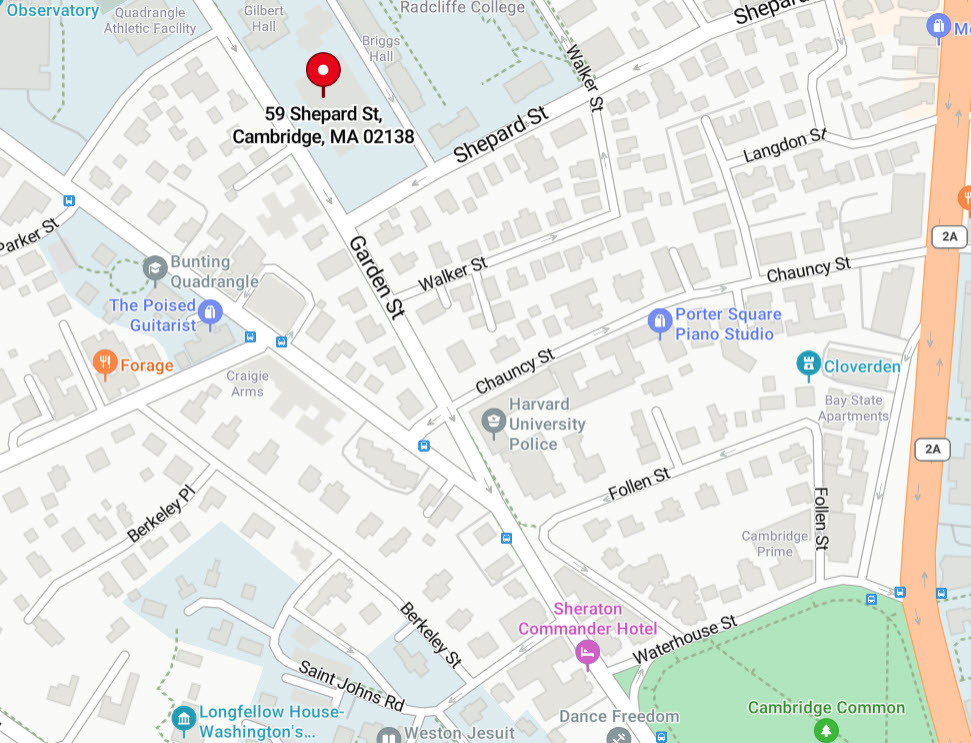
- Location: 59 Shepard St., Cambridge, MA 02188
- Contact: testingcenter@fas.harvard.edu
Testing Center Policies for Faculty and Teaching Staff
- Testing agreement submission policy: Instructors must submit testing agreements at least 5 business days before the first scheduled exam. Agreements submitted after this deadline may not be accommodated for the requested exam date.
- Exam pick up: You must pick up completed exams during pick-up hours. Testing Center staff will notify courses when exams are ready for pick up. The Testing Center does not scan or email completed exams.
- Exam upload: Exam file(s) should be uploaded in AIM at least 3 business days before the first scheduled exam date. NOTE: If a student requires a specific font size, that version must also be uploaded by the same deadline.
- Harvard‑provided laptops: Instructors who request Harvard‑provided laptops must submit exams in the correct format; all such laptops have internet disabled and require a Microsoft Word (.doc) file to ensure compatibility with the secure testing environment.
- Physical exam copies: If you have physical copies of an exam, you must bring them to the Testing Center located in the lower level of 59 Shepard St, Cambridge, no later than 3 business days before the exam to allow enough time for processing.
- AV policy: The Testing Center does not provide projectors or audiovisual (AV) equipment. Due to self-scheduling procedures and technological limitations, Testing Center staff are unable to administer exams requiring AV presentations or other AV components. Instructors may upload timed slideshows, presentations, video or audio files to AIM. Testing Center staff will provide these materials to students on USB drives. Students are responsible for completing the exam on their own devices using personal headphones, if needed.
- Online exams (ex: Canvas): Teaching staff are responsible for ensuring students can access their exams at the scheduled start time and for the full duration of any extended time accommodations. Instructors are responsible for correctly setting up online exams. Failure to do so may require the student to reschedule their exam. Any required passwords or passcodes must be provided to students at least 15 minutes before the exam or submitted to the Testing Center with the testing agreement for distribution.
- Extended time policy: Instructors may not provide additional exam time at the Testing Center beyond the accommodations approved by the Disability Access Office (DAO). Exam time is continuous and does not pause for questions, staff responses, or bathroom breaks. The scheduled end time will be enforced to ensure equity for all students and to manage limited Testing Center resources efficiently.
- Student scheduling: Students must schedule their exams at the FAS Testing Center no less than 3 business days before the main exam is scheduled to take place.
- Student late arrival: Students are allowed to arrive up to 30 minutes late for their scheduled exam. The time will be deducted from the exam time. If they arrive more than 30 minutes after their scheduled start time, they will be marked as a “No Show” and will not be permitted to take the exam at the Testing Center.
- Phone/smartwatch policy: Students taking exams at the Testing Center will be required to leave their cell phones and smart watches with the Testing Center staff for secure storage during the exam. Students who have a DAO-approved accommodation that requires phone access will be allowed to keep their devices with them during the exam.
- Makeup exams: If a student with testing accommodations misses a scheduled exam due to illness or another personal matter, they must contact the instructor for approval to reschedule. Once the instructor grants permission, the student may schedule their exam for the next available slot, at least three business days later.
Exam File Submission Policy
- Required File Format for Harvard‑Provided Laptops
Instructors who request Harvard‑provided laptops for students with a computer accommodation are responsible for submitting exam files in the correct format in AIM. University laptops with internet access disabled require a Microsoft Word (.doc) file for students who receive digital exam accommodations. This format ensures compatibility with the secure testing environment. - Special Exam Format Requirements
If a student requires a special exam format (e.g., enlarged font), the instructor is responsible for submitting the exam in the required format. This ensures compatibility with the secure testing environment. Contact Assistive Technology Center (ATC) at least five (5) business days before the testing center upload deadline for assistance (atc@fas.harvard.edu). - Submission Deadline
All exam materials - including standard versions and all alternative formats - must be uploaded to AIM by a member of course teaching staff no later than three (3) business days before the scheduled exam. Late submissions may impact the Testing Center’s ability to prepare materials. - File/Document Conversion
The Testing Center staff cannot convert exam files or upload exam files in AIM on behalf of instructors or departments. If you require assistance converting files/documents, you must contact the Assistive Technology Center (ATC) at least five (5) business days before the testing center upload deadline to request support (atc@fas.harvard.edu).
NOTE: only teaching staff with an active AIM account listed under a specific course can upload exam files in AIM. If you want your teaching staff members to have access and complete these steps in AIM on your behalf, please follow the steps listed under the "How to Use the Testing Center" below to request AIM access for them.
Student Responsibilities
- Students are responsible for initiating the process by submitting their Accommodation Action Plan at the start of the semester.
- The FAS Testing Center will provide students with instructions and reminders throughout the semester. Students should contact testingcenter@fas.harvard.edu with questions.
- Students are responsible for scheduling their exams no less than 3 business days before the main exam is scheduled to take place.
How to Use the Testing Center
To opt-in to use the Testing Center faculty must:
(1) complete the testing agreement at least 5 business days before the first exam date
and
(2) upload the exam file(s) to AIM at least 3 business days before the exam date
STEP 1: Instructor completes the FAS Testing Agreement
To complete the Testing Agreement, click on the link in the red box on the Accommodation Action Plan in an email you received from DAO, or follow the instructions below to navigate to the testing agreements for all of your courses.
You only need to fill out one Testing Agreement for each course. Along with opting into using the Testing Center, the Testing Agreement gives you the opportunity to communicate how you want your exam to be administered.
If you would like to request for additional faculty and Head Teaching Fellows to have access to complete the Testing Agreement, please email dao@fas.harvard.edu with the course title and ID and the following information for each additional instructor:
- Full Name
- HUID
- Harvard email address
Alternatively, you can follow the workflow or watch the demonstration video on how to manually add a teaching staff member in AIM.
Completing a Testing Agreement
1. Click on the link located in a student’s accommodation action plan or log into the Accessible Information Management System (AIM). You will be asked for your Harvard Key.
2. Click on Continue to View Student Accommodations.

3. To the left of the page under Home, click on Alternative Testing.

4. Click on Alternative Testing Agreement located top right of the page, or scroll down to see the number of courses you have without completed agreements and click on Courses without Alternative Testing Agreement.

5. Scroll to select your courses. Click on Specify Alternative Testing Agreement under the course you want to complete an agreement for.

6. Under Available Options for… select Testing Center Will Proctor Exams, then under Confirm Task use the drop-down menu to Confirm to Proceed. Click on Submit Your Selection.

7. Complete the agreement and enter the first exam date and time. You will be able to add additional exam dates after submitting the agreement. Click Submit and Continue to Specify Exam Dates.
Note:
- Space at the Testing Center is limited. Students cannot reserve an exam time at the Testing Center until you submit Exam Details for each test. Please input all exam dates and times for the semester as soon as you have completed the Alternative Testing Agreement.
- You can upload your exams for each exam date when you are adding the date or no later than three business days before the exam date.

8. To add additional exam dates, scroll down to Add Additional Exam Date and input the details for each exam.

Students are responsible for scheduling their exams at the FAS Testing Center no less than 3 business days before the main exam is scheduled to take place. Students who do not schedule their exams at least 3 business days before the main exam is scheduled may be required to take the exam with the rest of the class and forgo using their accommodations.
IMPORTANT:
- Every effort is made to ensure students take accommodated exams on the day of the main exam. However, we cannot guarantee that accommodated exams will always happen on the same day as the main exam, and we will work closely with faculty on these details.
STEP 2: Instructor uploads the exam(s) to Accessible Information Management System (AIM)
- Digital exams: You can upload your exam as soon as you have completed the Testing Agreement. You should upload your exam to AIM at least 3 business days before the exam. Please see instructions below. You can also refer to the workflow or watch the demonstration video.
- Physical exams: If you have physical copies of your exam, please email testingcenter@fas.harvard.edu to make an appointment. Exams should be dropped off at least 3 business days before the exam at the Testing Center in the basement level of 59 Shepard St. between 10:00am-4:00pm, Monday to Friday.
Upload Exam File(s) in AIM
1. After logging into AIM, go to Alternative Testing (1), then click on Upload to Exam Date (2).

2. On the next page, click on Modify by the exam date you're uploading a file(s) for.

3. Click Choose File within the Upload Additional Exam File box. Ensure that the Exam Date is correct. Use the following naming convention for the files:
Course, Exam Date, Type of Exam/File Name, [if applicable] Format/Student Name
e.g., CHEM 17, 4.23.25, Midterm 1
CHEM 17, 4.23.25, Formula Sheet
CHEM 17, 4.23.25, Midterm 1, 18pt Font
CHEM 17, 4.23.25, Midterm 1, John Harvard
Note:
- Only Word and PDF files should be uploaded.

4. Click Update Exam Date to save your file upload.
(Repeat steps 2-4 to upload additional files.)
Completed Exams - Pick Up
The Testing Center will email instructors when completed exams are ready for pick-up from 59 Shepherd Street, lower level. Testing Center staff cannot deliver exams or send them electronically.